
 | |
| - |
- Cane Supervisor
You can get Detailed Description Step By Step below-
| 15 (3)/2016 | |
| Rs.as per department rule | |
| Written Exam |
| 06/Dec/2019 |
How to See/Download Result?
You can follow Below Steps to Download Result.
- STEP 1 :To Download Result for UPSSSC (Uttar Pradesh Subordinate Services Selection Commission) - Cane Supervisor Go to url - http://upsssc.gov.in/Online_App/Results.aspx?ID=74&Result_Type=P&Exam_Code=5&Advt_Code=527&Dept_Code=346&Post_Code=1&OnlyIntview=No.
- It will look something like this
-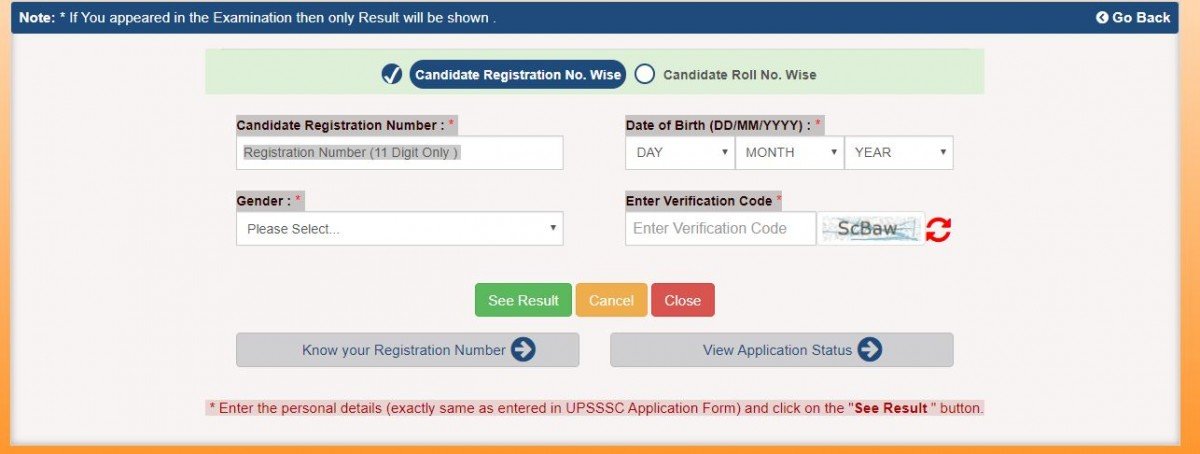
- STEP 2 : Enter Candidate Registration Number.
- STEP 3 : Enter Registration Number (11 Digit Only ).
- STEP 4 : Enter Date of Birth (DD/MM/YYYY) .
- STEP 5 : Select Gender.
- STEP 6 : Enter Verification Code.
- STEP 7 : Click on the See result button.
- STEP 8 : UPSSSC Cane Supervisor Result 2019 will be displayed.
| CLICK HERE | |
| CLICK HERE | |
| Download App [ For Latest Updates Download Our Andriod App ] | CLICK HERE |
| | |
| ✍ Previous Year Paper | CLICK HERE |
 | |
Important Exam Mock Tests
You can prepare for your exam with our online mock tests, Attend Test check your preparation & learn more. It's free of cost.
| Practice Test | GK Basic Test Math Mix Test Reasoning Test English Synonyms GK Physics GK Biology |
×
Comments-
Sarkari Naukri Exams-
Thanks for visiting us!
If you have any question please add a comment.
We will reply within 24 Hours.
Thanks & Regards!
Sarkari Naukri Exams.
Comment
Updated:
Highlights
✖
Advertisements

Comment